

How to Get the Most Out of KubeCon NA 2026 (Even If You're Watching From India)
A practical KubeCon NA 2026 guide for SRE and platform engineers in India: how the week works, 13 End User TAB talk picks, and how to follow it remotely.
KubeCon + CloudNativeCon North America 2026 runs from 9 to 12 November in Salt Lake City. For most SRE, DevOps and platform engineers in India, flying there isn't realistic. The good news: you can still get most of the value, if you plan for it.
This guide covers how KubeCon week is structured, which talks are worth your time (based on picks from the CNCF End User Technical Advisory Board), the engineering ideas behind them, how to watch remotely, and a few tips if you are attending in person. Everything here comes from official CNCF and Kubernetes sources, linked at the end.
Quick summary
- When: 9 to 12 November 2026, Salt Lake City. Monday is co-located events day; the main conference runs Tuesday to Thursday.
- Online? There is no virtual component. CNCF says keynote and breakout recordings will go up on its YouTube channel after the event.
- What to watch: 13 talks picked by the CNCF End User TAB, grouped below by problem area.
- Big theme: keeping clusters stable under AI and ML load, sharing GPUs, and running AI agents safely.
How KubeCon week works
KubeCon is four days, but they are not all the same. Knowing the shape of the week helps you decide what to watch.
| Day | What happens |
|---|---|
| Mon 9 Nov | Pre-event day with CNCF-hosted co-located events: Agentics Day: MCP + Agents, ArgoCon, BackstageCon, CiliumCon, Cloud Native AI + Inference Day, FluxCon, Kubernetes on Edge Day, Observability Day, Open Source SecurityCon, OpenTofu Day and Platform Engineering Day. Project Lightning Talks also run on this day. |
| Tue 10 Nov | The main conference starts: keynotes in the morning, then breakout sessions, Maintainer Track sessions, ContribFests and the Solutions Showcase. |
| Wed 11 Nov | Keynotes, breakouts, Maintainer Tracks, ContribFests and the Solutions Showcase. |
| Thu 12 Nov | The final day: keynotes, breakouts, Maintainer Tracks and ContribFests. |
A few terms worth knowing:
- Maintainer Track: sessions run by the people who maintain CNCF projects. This year's themes include Kubernetes autoscaling, device management, security, and authentication and authorization. Projects with sessions include OpenCost, Cilium, etcd, Linkerd, Karmada, containerd, SPIFFE, Rook and Falco.
- ContribFest: hands-on sessions where you work alongside maintainers on a project, such as Harbor, OpenTelemetry, Podman, Argo CD and Meshery. Some explicitly welcome first-time contributors.
- Co-located events: focused, single-topic events on the Monday. If you care about one area, like observability or platform engineering, these are worth checking first. In our view, they are often the most practical sessions of the week.
What to watch: talks picked by the End User TAB
The CNCF End User Technical Advisory Board (TAB) published its session picks for KubeCon NA 2026. We grouped them by the problems SRE and platform teams deal with most. Dates are given where the TAB post lists them.
Keeping big clusters stable
| Talk | What it covers | Date |
|---|---|---|
| Surviving the Churn: Read Replicas and Controllers for Busy Kubernetes Clusters | apiserver load, watcher relisting, and an Anthropic case study | 10 Nov |
| Anatomy of an Outage: When Bursty ML Workloads Break the Kubernetes Scheduler | Stabilising the scheduler and control plane with decoupled queues and Kueue tuning, presented by Isomorphic Labs and Google | 11 Nov |
| N Clusters, One kubectl: Multi-Cluster That Just Works | Multi-cluster developer experience, with a proxy built by Salesforce and NVIDIA | 10 Nov |
| Saturated by Design – Maximizing Cluster Allocation in On-Premises Kubernetes | On-premises capacity planning | 10 Nov |
Networking and cost
| Talk | What it covers | Date |
|---|---|---|
| Zero Downtime CNI Migration at Scale: Canal to Cilium Across Hundreds of Production Clusters | A large-scale CNI migration at Walmart | 10 Nov |
| From Packets to Paychecks: eBPF-Based Network Cost Attribution at Scale | Pod-level egress cost attribution at Adobe using eBPF | 12 Nov |
AI agents and GPUs
| Talk | What it covers | Date |
|---|---|---|
| Running Secure Agents at Scale | Multi-tenancy, tool access and data boundaries for agents | 11 Nov |
| Lessons Learned Sandboxing Agents with kagent | Agent sandboxing: filesystem, credentials, networking and identity | Not listed |
| GPU Observability with eBPF: From Kernel Hooks to Kubernetes Metrics | GPU telemetry with eBPF, integrated with Prometheus and OpenTelemetry | Not listed |
| Beyond the Cluster Boundary: Sharing GPUs at Scale | Integrating virtual kubelet with Kueue for GPU sharing | Not listed |
| Quota Isn't Enough: Topology Aware Scheduling on Modern GPU Clusters | Topology-aware GPU scheduling | Not listed |
Regulated and data-heavy environments
| Talk | What it covers | Date |
|---|---|---|
| Hardening Kubernetes for GovCloud: A 3-Year Journey to FedRAMP Moderate Authorization | Lessons from Verkada's team in a regulated environment | 11 Nov |
| Why We Bet the Data Platform on Kubernetes – And How AI Is Changing How We Operate It | An end user talk on AI in Day 2 operations | Not listed |
If you only have time for one, "Anatomy of an Outage" was recommended by two TAB members, Joseph Sandoval and Ricardo Rocha.
Schedule as of 4 November 2026. Talk days and times can change, so check the official KubeCon schedule before you plan your week.
The engineering ideas behind the picks
A watch list is more useful when you know the problem each talk is solving. Here are four ideas that come up again and again in this year's picks, explained from the official docs.
1. Why "watcher relisting" can hurt a busy cluster
Instead of polling the API server, most Kubernetes controllers and tools send a list request, get back a resourceVersion, and then open a watch from that version. The API server then streams every create, update and delete that happens after it.
GET /api/v1/namespaces/test/pods?watch=1&resourceVersion=10245
The catch is history. The API server only keeps a record of changes for a limited time. With etcd 3, that is the last 5 minutes by default. If a client asks to resume a watch from a version that is no longer available, it gets 410 Gone. It must then clear its local cache, run a fresh list, and start watching again.
List and watch · the 410 Gone relist path
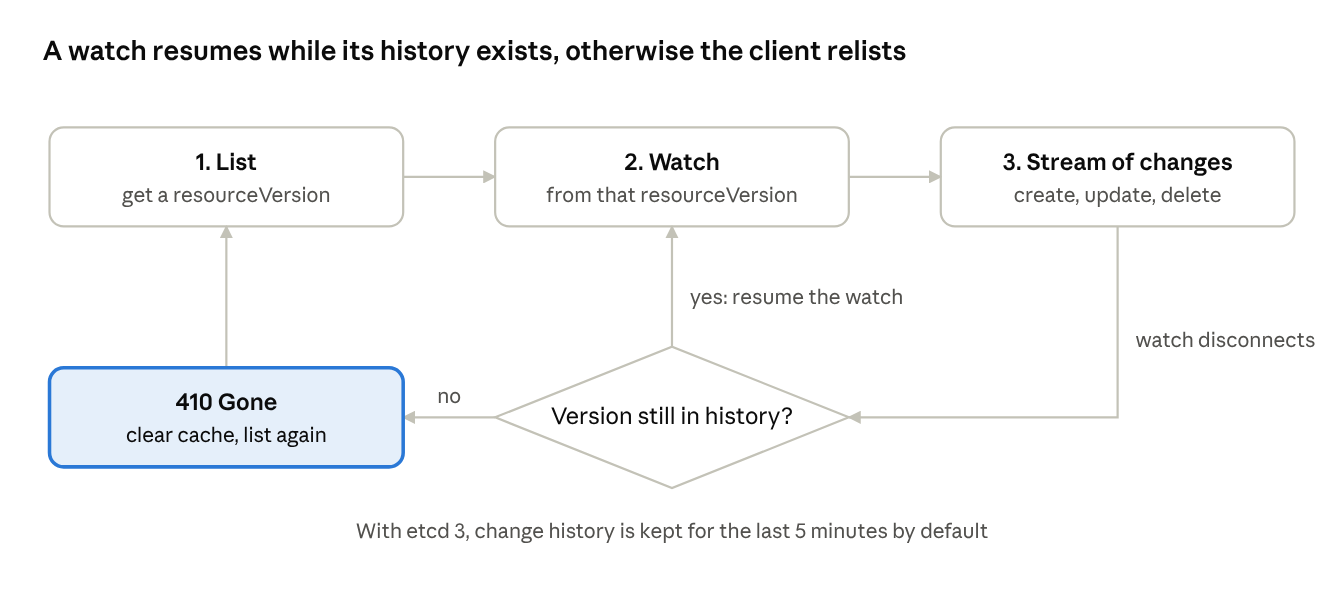
A disconnected watch can pick up where it left off, as long as its resourceVersion is still in the API server's history. If not, the client gets 410 Gone and has to list everything again.
One client doing that is fine. Hundreds doing it at once, all running full lists, can put real load on the API server. That is the territory of "Surviving the Churn", which covers apiserver load and watcher relisting. (Kubernetes API concepts)
2. Kueue: deciding when a job should start
Kueue is a Kubernetes-native queueing and scheduling system. It decides when, where and how training, inference and batch workloads run. It works alongside kube-scheduler, cluster-autoscaler and your job controllers instead of replacing them.
A few of its capabilities explain why it shows up in GPU talks:
- All-or-nothing (gang) scheduling: by default, no Pods start until there is quota for all of them, so a job doesn't start with only part of what it needs.
- Fair sharing: teams share quota, with borrowing through cohorts and optional preemption.
- Topology-Aware Scheduling: places Pods that talk to each other close together, such as on one rack.
"Anatomy of an Outage" covers Kueue tuning for bursty ML workloads, and "Quota Isn't Enough" covers topology-aware GPU scheduling.
3. RuntimeClass: picking a stronger runtime per Pod
RuntimeClass (stable since Kubernetes v1.20) lets you choose the container runtime configuration for each Pod. The docs describe the trade-off directly: for workloads that need a high level of isolation, you can run them in a runtime that uses hardware virtualization, at the cost of some extra overhead.
apiVersion: node.k8s.io/v1
kind: RuntimeClass
metadata:
  name: myclass
handler: myconfiguration
---
apiVersion: v1
kind: Pod
metadata:
  name: mypod
spec:
  runtimeClassName: myclass
If the named RuntimeClass doesn't exist, or the runtime can't run the handler, the Pod goes into the Failed phase. (Kubernetes docs: Runtime Class)
4. Agent Sandbox: one isolated, stateful Pod per agent
AI agents that run code need isolation. Agent Sandbox, a project under Kubernetes SIG Apps, adds a Sandbox custom resource for isolated, stateful, singleton workloads, such as AI agent runtimes. It gives each sandbox a stable identity and optional persistent storage.
It doesn't do the low-level isolation itself. It delegates that to sandbox runtimes like gVisor or Kata Containers by running Pods that use them through RuntimeClass. That connects directly to "Running Secure Agents at Scale" and "Lessons Learned Sandboxing Agents with kagent".
Agent Sandbox · from agent to sandbox runtime
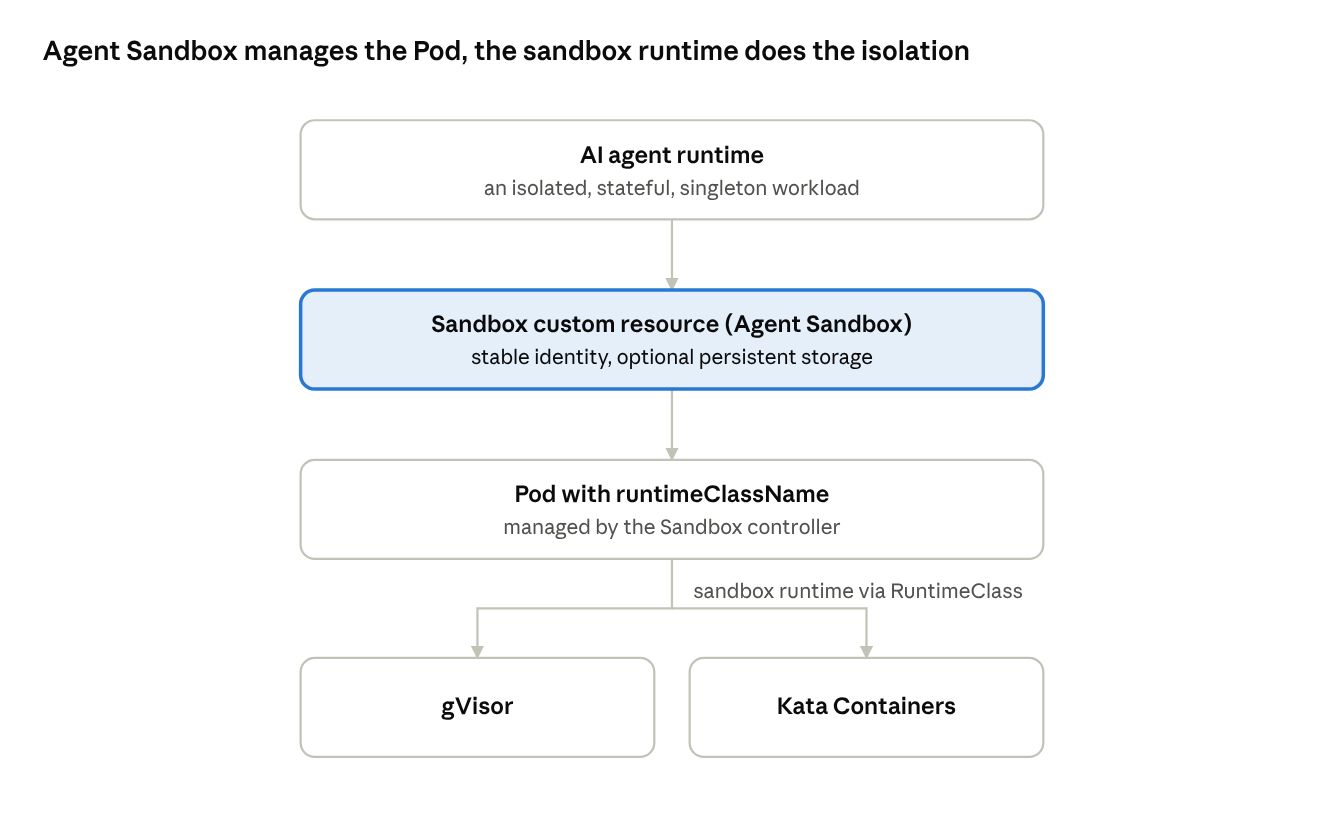
Agent Sandbox handles the lifecycle and identity of each sandbox. The actual isolation comes from the runtime the Pod runs on, chosen through RuntimeClass.
Watching from India: how to make it count
KubeCon NA 2026 does not have a virtual component, so you can't attend the sessions online. According to CNCF, breakout and keynote recordings will be posted to the CNCF YouTube channel afterwards, within two weeks.
That means remote viewers watch on their own schedule. Here is how we suggest making that time useful:
- Build your watch list now. Pick three to five talks from the list above that match a problem your team has today. A short list you actually finish beats a long one you never start.
- Watch with a question in mind. Before each talk, write down one question, like "How do they keep the scheduler stable under bursty load?" It helps you remember what matters.
- Note one thing to try. After each talk, write down one change you could test in a lab or staging cluster within a week.
- Share it with your team. A 10-minute summary in your next team meeting turns one person's viewing into team learning.
- Follow the project repos. Many talks link to code, configs or blog posts. Those can be more useful than the slides.
We will also share the best KubeCon takeaways in our weekly newsletter, The Week in Ops, on LinkedIn.
If you are attending: tips from the End User TAB
If you or your team are going to Salt Lake City, the End User TAB shared a few tips that are easy to miss:
- Go to the Birds of a Feather (BoF) sessions. They are an open floor for the new end user groups: Platform Engineering, Public Sector, Telecom and Research.
- Join the agentic AI session. Attendees will try to build a reference architecture for agentic AI deployments, live.
- Visit the End User TAB Town Hall in the project pavilion, where you can ask questions right next to the projects.
- Check out the poster sessions for in-depth conversations with the authors.
- Use the hallway track to learn about other practitioners' pain points and solutions.
- Talk to maintainers in the project pavilion about roadmaps, adoption and technical gaps, especially for sandbox and incubating projects.
Check your pass before you plan Monday. According to CNCF, the co-located events need an All-Access Pass. The KubeCon + CloudNativeCon Only Pass includes the Project Lightning Talks but not the co-located events.
Our take
The themes this year say a lot about where operations is heading. Look at the TAB picks: keeping the control plane stable under bursty ML load, sharing and scheduling GPUs, and running AI agents safely on shared clusters. In our view, AI workloads are no longer a side topic at KubeCon. They are now a core reliability problem for SRE and platform teams.
You don't need to be in Salt Lake City to learn from that. A focused watch list and one experiment per talk will get you most of the value.
FAQ
When is KubeCon NA 2026?
9 to 12 November 2026 in Salt Lake City, Utah. Monday 9 November is the co-located events day, and the main conference runs Tuesday to Thursday.
Can I watch KubeCon NA 2026 online?
There is no virtual component. CNCF says keynote and breakout recordings will be posted to its YouTube channel within two weeks.
Which talks should SRE engineers watch?
Start with the End User TAB picks above. "Anatomy of an Outage" and "Surviving the Churn" focus on control plane stability, and "Zero Downtime CNI Migration at Scale" covers a large production migration.
What is a ContribFest?
A hands-on session where attendees work with project maintainers. Some explicitly welcome first-time contributors.
Do I need a special pass for the Monday co-located events?
Yes. CNCF says they require an All-Access Pass. The KubeCon + CloudNativeCon Only Pass covers the Project Lightning Talks but not the co-located events.
Stay updated
We will cover the most useful KubeCon NA 2026 takeaways for SRE, DevOps and platform engineers in The Week in Ops, our weekly LinkedIn newsletter. Follow gogoai.dev on LinkedIn and subscribe to the newsletter so you don't miss it.
Sources
- KubeCon + CloudNativeCon NA 2026: End User TAB recommendations and tips, CNCF blog, 29 October 2026, by the CNCF End User TAB
- KubeCon + CloudNativeCon North America 2026: Your Week in Salt Lake City, CNCF blog, 11 September 2026
- CNCF End User Technical Advisory Board
- KubeCon + CloudNativeCon North America 2026: official schedule
- Kubernetes API concepts: Efficient detection of changes
- Kubernetes docs: Runtime Class
- Kueue on GitHub
- Agent Sandbox on GitHub